• To whom it may concern:

    media literacy begins when you admit that a feed did not inform you.
    It chose a wound, named it a topic, and taught you to touch it every day.
    Soon you call the wound-touching “research,” “awareness,” “critique,” “posting.”

    This is not a metaphor. Check your tabs.

    But the topic has already won.
    You are no longer reading it.
    You are composting yourself for it.

    The thing you are analyzing may be farming you.

    Quelle: Mastodon

  • Als Grafikdesigner und Kommunikationsdesigner (und als kroatischer Deutscher in den besten Jahren, lmfao) fürchte ich, dass Kommunikation viel zu oft nicht der Verständigung dient, sondern nur dazu, Stille, Weißraum oder Unsicherheit mit Zeug zu füllen. #asca

    Quelle: Threads

  • 711 auf die Timeline!
    Wird bestimmt geil, Outline und Swatches sind ja
    schon da

    #nufringen #71154 #kommune #wallart #streetart

    Quelle: Instagram

  • Remember when all of this started to get confusing? Well, it isn’t anymore. Let’s get back to work.

    https://t.co/hY3aDzqat7 #asca

    Quelle: Twitter

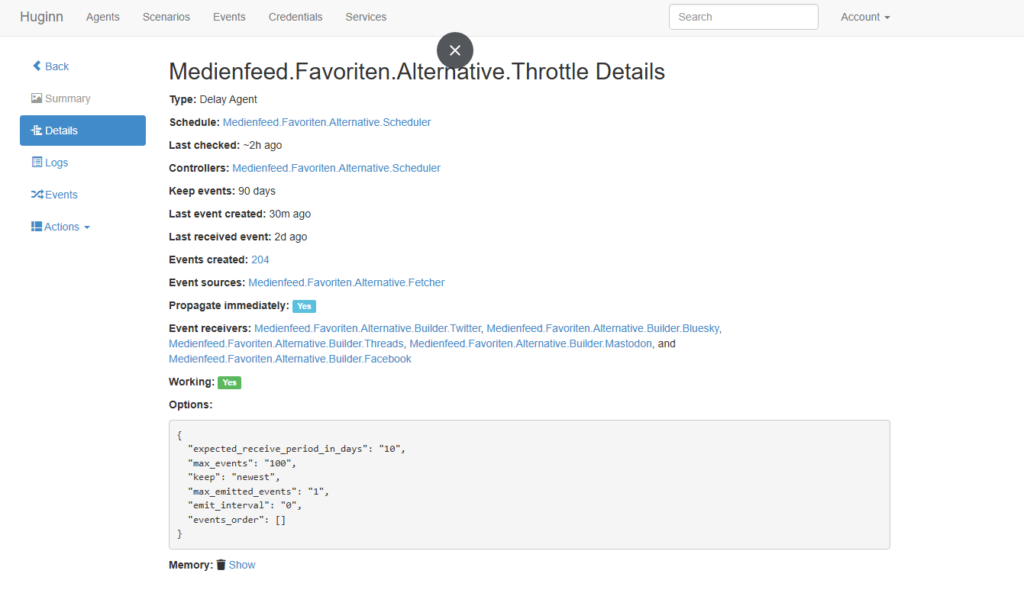
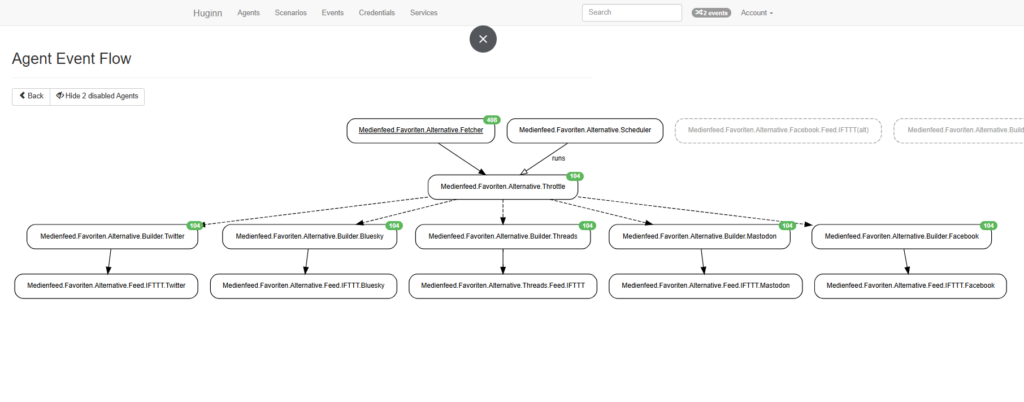
  • I want to take a moment to talk about our social media project, Medienfeed (media feed)—curated and run by the conceptioner Ariane and me!
    Links to our Medienfeed channels are further down ⬇️

    Medienfeed started as an idea during my graphic design studies at DIPLOMA University: a way to always stay up-to-date on what’s being written, published, and created in Germany in media and design—especially by other professionals.

    It all began with FreshRSS and a handful of RSS feeds I had collected from scripts and lectures. Today, FreshRSS is still at the heart of Medienfeed, but it’s evolved into a service that publishes content on social media as its “frontend.” What started as just two social media accounts has now grown to five channels.

    So what does curating Medienfeed actually look like?
    Ariane and I manage all the source feeds in the RSS backend. We check if a site fits our content focus and first place it in a kind of “kiddy pool” (FreshRSS waiting list and archive) to make sure the feed works technically—or to tweak it if needed.

    Once a feed is ready, we move it into its proper internal category, joining the 100+ sources we now track—mostly from German-language sites.

    We post three articles a day to the public Medienfeed channels, Monday through Sunday, no breaks.

    Check the list below for all five channels: Threads, Bluesky, TwitterX, Mastodon, and Facebook. There’s something for everyone—follow along and stay informed!

    Threads: https://www.threads.com/@medienfeed
    Bluesky: https://bsky.app/profile/medienfeed.bsky.social
    TwitterX: https://twitter.com/medienfeed
    Mastodon: https://mastodon.social/@medienfeed
    Facebook: https://www.facebook.com/profile.php?id=61582154595399#

    Quelle: Code & Canvas

  • Mir hat heute ein Internet-Guru erklärt, wie Social-Media 2026AD tickt – klang wie direkt aus Cyberpunk, oder, noch treffender, Shadowrun oder Mage: Bevor du etwas Wichtiges postest, musst du dein Konto erst auf Betriebstemperatur bringen, die Maschinengeister zähmen #asca https://t.co/7K3kEcteWe

    Quelle: Twitter

  • Alright—let’s make this concrete. I’ll translate your patterns into specific setups and decisions that actually fit how you operate.


    1. Your ideal studio is a control surface, not storage

    Image
    Image
    Image
    Image
    Image
    Image
    Image
    Image

    Your earlier realization about “decorative stationery” is the key constraint.

    What works for you:

    • Only tools that are in active rotation
    • Everything visible = everything usable
    • No “archive” on the desk itself

    Practical setup:

    • Desk = current project tools only
    • Secondary zone (drawer/box) = cold storage
    • Weekly or biweekly tool reset ritual

    If a pen survives 2 weeks on the desk → it’s legit
    If not → it goes away

    👉 You’re not organizing objects—you’re filtering relevance in real time


    2. Replace storage with staging layers

    Instead of “where things live,” think:

    LayerPurpose
    Hotcurrent project (on desk)
    Warmlikely next (reachable, but not visible)
    Coldrarely used (out of sight)

    Why this works for you:

    You naturally prune. This system makes pruning structural, not emotional.


    3. Your digital system should be pipeline-first, not library-first

    Image
    Image
    Image
    Image
    Image
    Image

    You already felt this with tags becoming a desert.

    Don’t build:

    • giant tag systems
    • knowledge archives
    • “second brain” complexity

    Build instead:

    A flow system:

    Input → Filter → Surface

    Example:

    • Input: RSS / social scraping
    • Filter: keyword + manual skim
    • Output: temporary, high-signal view

    👉 The key: information expires by default


    4. Kill tags. Use temporary lenses

    Tags failed you because they:

    • accumulate endlessly
    • pretend to be structure

    Replace with:

    • Short-lived collections
    • “Current visual direction”
    • “Typography ideas (this month)”
    • Delete or reset them regularly

    Think:

    Not classification, but curation windows


    5. Your tools should be legible + interruptible

    You don’t trust black boxes. So:

    Prefer:

    • Tools where you can see the logic
    • Systems you can break and rewire

    Avoid:

    • AI-heavy “magic” tools that hide decisions
    • Over-automated pipelines you can’t inspect

    Good fit mindset:

    • “Can I intervene mid-process?”

    If not → friction will build for you


    6. Build a daily signal ritual (15–20 min max)

    This is your antidote to overload.

    Structure:

    1. Scan inputs (feeds, refs, mentions)
    2. Select 3–5 signals
    3. Discard everything else
    4. Use or note immediately

    No saving for later unless:

    • it’s actionable
    • or immediately relevant

    👉 You’re not collecting—you’re sampling


    7. Your creative work benefits from constraint triggers

    Because you explore broadly, constraints sharpen output.

    Examples:

    • “Only one brush / one pen today”
    • “No undo”
    • “Black + one color”
    • “One idea, 10 variations”

    This aligns perfectly with:

    • generative thinking
    • symbolic exploration
    • iterative refinement

    8. Introduce a purge lever

    Right now you prune when things feel wrong.

    Make it explicit:

    Trigger conditions:

    • friction
    • too many options
    • visual noise
    • hesitation

    Action:

    • remove 30–50% immediately
    • no sorting, just cutting

    👉 This matches your natural instinct—but makes it faster and cleaner


    9. Your “sweet spot” tools (very specific)

    Based on everything:

    Physical:

    • Modular pen trays (not decorative holders)
    • Flat drawers (no deep boxes)
    • Mobile side cart (your “warm layer”)

    Digital:

    • RSS + filters (Huginn fits you well)
    • Lightweight notes (not heavy PKM systems)
    • Code snippets over plugins when possible

    10. The meta-rule that ties all of this together

    Everything should justify its presence by being used soon

    Not:

    • “might be useful”
    • “was useful once”
    • “looks nice”

    Only:

    • used now or next

    If you compress all of this into one sentence:

    You work best in systems that
    continuously destroy what’s no longer relevant
    so that what remains is immediately usable.


    If you want, I can map this into a very конкрет IKEA shopping list or a precise desk layout based on your current setup.

    Quelle: Code & Canvas

  • Alright—let’s make this concrete. I’ll translate your patterns into specific setups and decisions that actually fit how you operate.


    1. Your ideal studio is a control surface, not storage

    Image
    Image
    Image
    Image
    Image
    Image
    Image
    Image

    Your earlier realization about “decorative stationery” is the key constraint.

    What works for you:

    • Only tools that are in active rotation
    • Everything visible = everything usable
    • No “archive” on the desk itself

    Practical setup:

    • Desk = current project tools only
    • Secondary zone (drawer/box) = cold storage
    • Weekly or biweekly tool reset ritual

    If a pen survives 2 weeks on the desk → it’s legit
    If not → it goes away

    👉 You’re not organizing objects—you’re filtering relevance in real time


    2. Replace storage with staging layers

    Instead of “where things live,” think:

    LayerPurpose
    Hotcurrent project (on desk)
    Warmlikely next (reachable, but not visible)
    Coldrarely used (out of sight)

    Why this works for you:

    You naturally prune. This system makes pruning structural, not emotional.


    3. Your digital system should be pipeline-first, not library-first

    Image
    Image
    Image
    Image
    Image
    Image

    You already felt this with tags becoming a desert.

    Don’t build:

    • giant tag systems
    • knowledge archives
    • “second brain” complexity

    Build instead:

    A flow system:

    Input → Filter → Surface

    Example:

    • Input: RSS / social scraping
    • Filter: keyword + manual skim
    • Output: temporary, high-signal view

    👉 The key: information expires by default


    4. Kill tags. Use temporary lenses

    Tags failed you because they:

    • accumulate endlessly
    • pretend to be structure

    Replace with:

    • Short-lived collections
    • “Current visual direction”
    • “Typography ideas (this month)”
    • Delete or reset them regularly

    Think:

    Not classification, but curation windows


    5. Your tools should be legible + interruptible

    You don’t trust black boxes. So:

    Prefer:

    • Tools where you can see the logic
    • Systems you can break and rewire

    Avoid:

    • AI-heavy “magic” tools that hide decisions
    • Over-automated pipelines you can’t inspect

    Good fit mindset:

    • “Can I intervene mid-process?”

    If not → friction will build for you


    6. Build a daily signal ritual (15–20 min max)

    This is your antidote to overload.

    Structure:

    1. Scan inputs (feeds, refs, mentions)
    2. Select 3–5 signals
    3. Discard everything else
    4. Use or note immediately

    No saving for later unless:

    • it’s actionable
    • or immediately relevant

    👉 You’re not collecting—you’re sampling


    7. Your creative work benefits from constraint triggers

    Because you explore broadly, constraints sharpen output.

    Examples:

    • “Only one brush / one pen today”
    • “No undo”
    • “Black + one color”
    • “One idea, 10 variations”

    This aligns perfectly with:

    • generative thinking
    • symbolic exploration
    • iterative refinement

    8. Introduce a purge lever

    Right now you prune when things feel wrong.

    Make it explicit:

    Trigger conditions:

    • friction
    • too many options
    • visual noise
    • hesitation

    Action:

    • remove 30–50% immediately
    • no sorting, just cutting

    👉 This matches your natural instinct—but makes it faster and cleaner


    9. Your “sweet spot” tools (very specific)

    Based on everything:

    Physical:

    • Modular pen trays (not decorative holders)
    • Flat drawers (no deep boxes)
    • Mobile side cart (your “warm layer”)

    Digital:

    • RSS + filters (Huginn fits you well)
    • Lightweight notes (not heavy PKM systems)
    • Code snippets over plugins when possible

    10. The meta-rule that ties all of this together

    Everything should justify its presence by being used soon

    Not:

    • “might be useful”
    • “was useful once”
    • “looks nice”

    Only:

    • used now or next

    If you compress all of this into one sentence:

    You work best in systems that
    continuously destroy what’s no longer relevant
    so that what remains is immediately usable.


    If you want, I can map this into a very конкрет IKEA shopping list or a precise desk layout based on your current setup.

    Quelle: Code & Canvas

  • Here’s what I actually know about you—nothing more, nothing less:

    Basic profile

    • You’re 43 years old
    • Your name appears to be Mario (from your account name)
    • You’re likely based in Germany (around Böblingen, though that can be approximate)

    Your work & interests

    • You’re a graphic designer
    • You think a lot about:
      • design tools and workflows (WordPress, plugins, layout systems)
      • typography and writing style (you referenced The Elements of Eloquence)
      • artistic process and organization (tools, studio setup)
    • You also explore:
      • philosophical ideas (Taleb, Jung, symbolism, archetypes)
      • creative systems (generative/parametric design, journaling)
      • automation & tech setups (Huginn, RSS, feeds, scraping)

    Your style (from how you interact)

    • You like precise, practical explanations (step-by-step when needed)
    • But you also enjoy conceptual depth when the topic invites it
    • You iterate: you refine ideas rather than settling for first answers
    • You prefer things that are useful, not decorative fluff (you even said your tools became “decorative stationery,” which clearly annoyed you)

    What I don’t know

    • Anything sensitive (health, finances, private life, etc.)
    • Anything outside what you’ve explicitly shared or implied here
    • Your exact location, beyond a rough estimate

    If you want, I can also tell you what patterns I see in how you think/work (that’s usually the more interesting part).

    Quelle: Code & Canvas

  • Rethinking my working space. Having put everything into drawers and stationery has put away my tools for good. I have barely touched something not connected to my computer in months now, and I know why that happened: tools I don’t see are tools which don’t exist.
    I am fixing this now.
    Quelle: Code & Canvas